SQL Server Table Partitioning: When It Saves You… and When It Destroys Your Performance
Let me start with something uncomfortable.
Most people who talk about partitioning in SQL Server don’t actually need it.
Partitioning has become one of those “advanced DBA badges.” People want to implement it because it sounds powerful. But the real question I always ask is:
What problem are you trying to solve?
Because partitioning is not a magic performance button.
It is a scalability and data lifecycle strategy.
And if you don’t understand that difference, you can easily make your environment slower and more complex.
I’ve used partitioning in environments with hundreds of millions and billions of rows. I’ve also seen environments completely destroyed by unnecessary partitioning.
So let me walk you through how I think about it — based on real experience.
First: When Do I Even Consider Partitioning?
People always ask me:
“Sandro, how many rows justify partitioning?”
Microsoft doesn’t give a number.
My personal trigger?
Around 500 million rows, depending on:
- Infrastructure capacity
- Growth rate
- Insert frequency
- Delete/archive requirements
- Concurrency levels
But here’s the truth:
It’s not about row count alone.
It’s about pain.
I consider partitioning when:
- Index rebuilds start taking too long
- Maintenance windows are shrinking
- DELETE operations are killing the transaction log
- Data movement between active and historical tables becomes slow
- Inserts are happening at extremely high rates
- Concurrency is heavy and I/O is becoming a bottleneck
If I can fix the issue with:
- Better indexing
- Query tuning
- Statistics updates
- Code refactoring
- Parameter sniffing fixes
- Plan guides
- OPTION (RECOMPILE)
I will always do that first.
Partitioning is not the first tool.
It is a structural decision.
What Partitioning Actually Is (Without the Marketing)
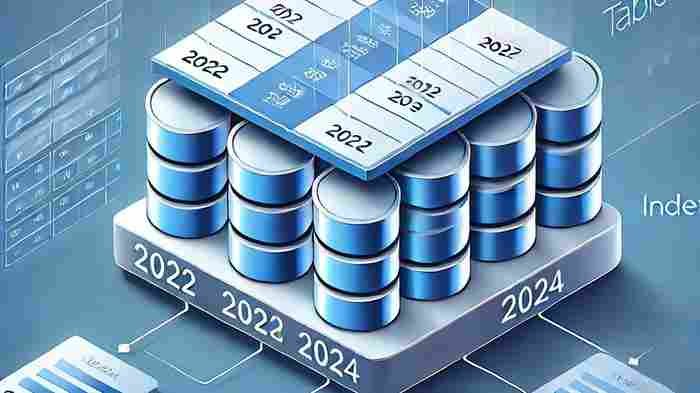
Partitioning divides a table into multiple internal segments based on a column — usually a date.
SQL Server still sees one table.
Applications see one table.
But internally, data is separated.
That separation enables three major things:
- Partition elimination (read only what matters)
- Faster maintenance (operate on slices)
- Data lifecycle management (archive/delete efficiently)
If your queries don’t filter by the partition column, partitioning will not help you.
In fact, it may hurt you.
Logical vs Physical Partitioning (And Why Most People Get This Wrong)
Logical Partitioning
All data files remain on the same disk.
Partitions exist only for organization and management.
You gain:
- Faster partition-level maintenance
- Easier sliding window operations
- Faster large deletes via switching/truncate
- Smaller index rebuild operations per partition
You do NOT gain:
- Better I/O distribution
Everything still hits the same disk.
Physical Partitioning
Now we’re talking real architecture.
You distribute partitions across different FILEGROUPs.
Those FILEGROUPs live on different disks.
Now:
- 2023 data might be on SSD
- 2022 data on slower storage
- Archive data on cheaper storage
Now you get:
- I/O parallelism
- Better insert throughput
- Better concurrency
- Storage tiering strategy
This is where partitioning becomes strategic.
But it also becomes more complex.
The Real Power: Data Deletion Without Pain
Let’s talk about something DBAs suffer with:
DELETE FROM LargeTable WHERE DateColumn < '2023-01-01';
On a table with 600 million rows?
Good luck.
- Massive transaction log growth
- Lock escalation
- Blocking
- Fragmentation
- Long execution time
Now compare that to partitioning done correctly.
If old data lives in its own partition and filegroup:
You can:
- Switch it out
- Truncate it
- Remove the filegroup
And the deletion is almost instantaneous.
Why?
Because you’re not deleting rows.
You’re removing data structures.
That’s a massive difference.
When Partitioning Makes Things Worse
Let me be honest.
Partitioning can destroy performance if:
1. Your queries don’t filter by the partition column
If you partition by DateCreate but query by CustomerId, SQL Server still scans multiple partitions.
You gain nothing.
2. The table is small
If your table has 10 million rows on modern hardware?
Partitioning is unnecessary complexity.
Indexes solve more problems than partitions in 80% of cases.
3. Data is unevenly distributed
If 90% of activity happens in one month, and you partition by month:
One partition is overloaded.
Others are almost empty.
You gain nothing.
Partitioning must follow data behavior, not calendar logic.
4. Your team is not ready
Partitioning affects:
- Backup strategy
- Restore operations
- Index maintenance
- Monitoring
- Filegroup management
If the team doesn’t understand sliding window techniques, partition switching, aligned indexes — you’re creating operational risk.
The Sliding Window Strategy (Where Partitioning Becomes Elegant)
The most beautiful use case of partitioning is this:
- Create partitions ahead of time
- Insert new data into the newest partition
- Periodically switch old partitions into archive tables
- Drop old partitions instantly
This gives you:
- Controlled growth
- Predictable maintenance
- Minimal logging operations
- Clean data lifecycle
This is not about performance only.
This is about governance.
Parameter Sniffing and Partitioning (Advanced Insight)
Now let’s talk real DBA pain.
Before SQL Server 2022, parameter sniffing could cause serious instability in date-based queries.
If you cannot change stored procedures and cannot use OPTION (RECOMPILE), and if your workload is heavily date-based, partitioning sometimes stabilizes performance because partition elimination reduces plan sensitivity.
But that is an architectural workaround.
Not a tuning best practice.
Always tune first.
Partition second.
Massive Insert Workloads and Disk Distribution
In high-concurrency environments:
- Thousands of inserts per second
- Heavy I/O
- Lock contention
Physical partitioning across multiple disks allows:
- Write distribution
- Reduced bottlenecks
- Higher parallelism
This is where partitioning becomes infrastructure design.
Not just a database feature.
When I Absolutely Recommend Partitioning
I strongly consider it when:
- Table exceeds 500M rows and growing fast
- You need to archive/delete large chunks regularly
- You need to move large volumes to history tables
- You have heavy insert concurrency
- You need to distribute I/O across disks
- Maintenance windows are collapsing
When I Absolutely Do NOT Recommend It
- Small or medium tables
- Queries don’t filter by partition key
- No data lifecycle requirements
- Team lacks experience
- You haven’t optimized indexes yet
Final Thoughts — My Real Position on Partitioning
Partitioning is not about speed.
It’s about control at scale.
It gives you:
- Predictability
- Manageability
- Data lifecycle power
- Operational flexibility
But it adds:
- Complexity
- Architectural responsibility
- Maintenance overhead
The worst thing you can do is partition because “big companies do it.”
The right thing to do is partition because your workload demands it.
I’ve seen partitioning save environments.
I’ve also seen it complicate environments unnecessarily.
So before implementing it, ask yourself:
Am I solving a real problem — or creating a new one?
That’s how I approach partitioning.
🚀 Ready to boost your career in data?
👉 DBAcademy – DBA & Data Analyst Training
Over 1,300 lessons and 412 hours of exclusive content.
Includes subtitles in English, Spanish, and French.
🔗 https://filiado.wixsite.com/dbacademy
💡 Start learning today and become a highly in-demand data professional.
Share this content:


Post Comment